
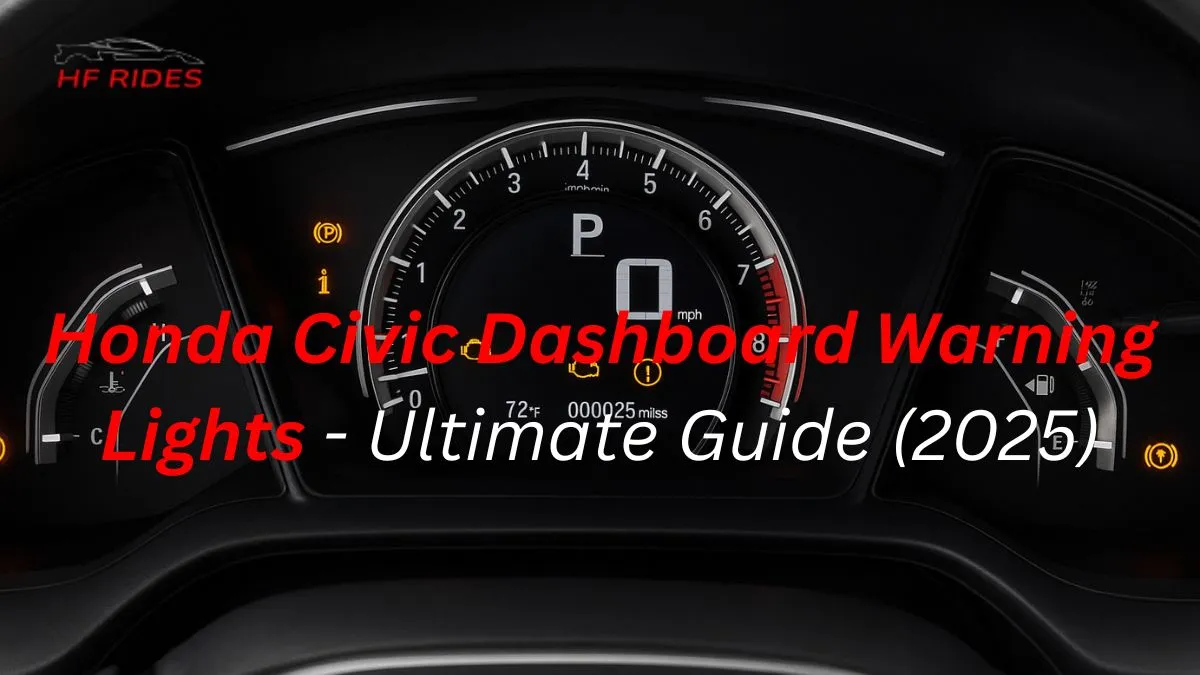
Honda Civic dashboard warning lights use color codes to show system status. Red lights mean stop immediately, yellow/amber lights require attention soon, and green/blue lights indicate active features.
Introduction
The Honda Civic dashboard warning lights symbols are crucial indicators that keep you informed about your vehicle’s health and safety.
Each symbol, whether red, amber, green, or blue, represents a specific system status — from critical alerts like engine overheating or brake issues to informational signals such as active cruise control or high beams.
Understanding these dashboard symbols not only helps prevent costly repairs but also ensures safe driving. This comprehensive guide explains every Honda Civic dashboard warning light in detail, including what each light means, the urgency of the alert, and the proper actions you should take.
Dashboard Warning Light Colors & What They Mean
Honda Civic dashboard lights use color codes to show the urgency of each alert.
Red lights indicate immediate danger and require stopping the vehicle safely. Amber or yellow lights warn you that a system needs attention soon, like tire pressure or an engine check. Green lights show active systems working normally, such as cruise control. Blue lights are informational, mostly related to lighting systems like high beams.
Understanding these colors helps you respond correctly and drive safely.
Red Dashboard Warning Lights (Critical / Immediate Action)
Red Honda Civic dashboard warning lights signal critical problems that need immediate attention. Ignoring these alerts can cause serious damage or safety risks. Common red lights include:
- Engine Temperature Warning → Indicates overheating. Stop safely and check coolant level.
- Oil Pressure Warning → Signals low oil pressure. Add oil immediately and avoid driving.
- Brake System Warning → Brake or parking brake issue detected. Inspect brake fluid and service promptly.
- Battery / Charging System Warning → Electrical system fault. Check the battery and alternator as soon as possible.
These critical indicators require urgent action to protect your vehicle and ensure driver safety.
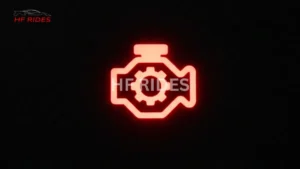
Amber / Yellow Dashboard Warning Lights (Caution / Attention Needed)
Amber or yellow Honda Civic dashboard warning lights indicate system caution or attention needed soon. These lights are advisory alerts rather than critical problems, but ignoring them can lead to bigger issues. Common amber/yellow lights include:
- Check Engine Light (MIL) → Engine or emission system alert; scan OBD‑II codes.
- TPMS (Tire Pressure Monitoring System) → Low tire pressure; inflate to recommended PSI.
- ABS Warning → Anti-lock brake system issue; schedule maintenance soon.
- Traction Control / VSA → Stability control malfunction; drive safely and service soon.
- Power Steering / EPS → Electric Power Steering alert; check system promptly.
Understanding these cautionary indicators helps you take timely action and prevent damage while keeping your Honda Civic safe.
Green & Blue Dashboard Lights (Informational / Active Systems)
Green and blue Honda Civic dashboard lights indicate normal system operation or informational alerts. These lights are not warnings but show which systems are active or providing status updates.
- Green Lights – Active Systems
- Cruise Control Active → System engaged, vehicle maintaining speed.
- ECON Mode Indicator → Fuel-efficient mode active.
- Turn Signals → Left or right indicators operating normally.
- Blue Lights – Informational / Lighting Indicators
- High Beam Indicator → High beams are on.
- Auto High Beam Active → System automatically managing high beams.
Recognizing these informational indicators helps you understand system status, avoid confusion, and maintain safe driving habits.
| Symbol / Icon | Color | Meaning | Recommended Action |
|---|---|---|---|
| Engine Temperature | Red | Engine overheating; critical system alert | Stop safely, check coolant, avoid driving |
| Oil Pressure Warning | Red | Low oil pressure; engine lubrication at risk | Add oil immediately, service vehicle |
| Brake System Warning | Red | Brake or parking brake malfunction | Inspect brake fluid, pads, or calipers; service ASAP |
| Battery / Charging System | Red | Battery/alternator fault; electrical system risk | Check battery and alternator; service needed |
| Check Engine Light (MIL) | Yellow | Engine or emissions system advisory | Scan OBD-II codes, schedule maintenance |
| TPMS (Tire Pressure) | Yellow | Low tire pressure detected | Inflate tires to recommended PSI |
| ABS Warning | Yellow | Anti-lock brake system issue | Continue driving cautiously, service soon |
| Traction / VSA Warning | Yellow | Stability control malfunction | Drive safely, get system checked |
| Power Steering / EPS | Yellow | Electric Power Steering alert | Inspect system and service promptly |
| Low Fuel Warning | Yellow | Fuel level low | Refuel soon |
| Seat Belt Reminder | Red | Seatbelt not fastened | Buckle up immediately |
| Airbag / SRS Warning | Red | Airbag system malfunction | Service immediately for safety |
| Cruise Control Active | Green | Cruise control system engaged | Normal operation |
| ECON Mode | Green | Fuel-efficient mode active | Normal operation |
| Turn Signals | Green | Left/right indicator active | Normal operation |
| High Beam Indicator | Blue | High beams turned on | Informational only |
| Auto High Beam Active | Blue | Automatic high beam system active | Informational only |
How to Check & Diagnose Honda Civic Warning Lights
If a Honda Civic dashboard warning light appears, it’s important to diagnose the issue correctly to prevent damage or safety risks. Follow these steps:
- Use the Owner’s Manual → Each symbol is explained with its meaning and recommended action.
- Scan with an OBD‑II Tool → Identify engine, emissions, or system codes quickly.
- Inspect Critical Systems → Check coolant, oil, brake fluid, battery, and tire pressure depending on the light.
- Observe Driving Behavior → Note if lights appear under certain conditions (engine start, braking, or high speed).
- Schedule Professional Service → If the warning persists or is red/critical, get it checked immediately.
Understanding what each dashboard symbol indicates and following these diagnostic steps ensures safe driving and prevents costly repairs.
Resetting Dashboard Warning Lights
Sometimes, Honda Civic dashboard warning lights remain on even after fixing the issue. Proper resetting ensures accurate monitoring:
- Minor Resets After Maintenance → Some lights, like oil change or service reminders, reset automatically or via the instrument cluster settings.
- OBD‑II Scanner Reset → Use a diagnostic tool to clear engine or emission codes safely.
- Do Not Reset Without Fixing → Resetting critical warnings like brake, oil, or airbag lights without resolving the issue can damage the vehicle or compromise safety.
- Check Dashboard Post-Reset → Ensure all systems show normal operation; repeat scan if necessary.
Following these steps helps maintain accurate alerts and keeps your Honda Civic safe and fully operational.
Model & Year Variations
Honda Civic dashboard warning lights can differ slightly depending on the model year or trim. Understanding these variations ensures you interpret each symbol correctly:
- Civic 2016–2018 → Standard lights include engine, oil, brakes, ABS, and TPMS; hybrid models add battery-specific alerts.
- Civic 2019–2021 → Some symbols updated in instrument cluster graphics; lane assist or adaptive cruise indicators may appear.
- Civic 2022–2025 → Advanced infotainment clusters may show digital representations of red, amber, green, and blue lights; auto high beam and ECON mode icons may differ slightly.
- Trim Differences → Sport or Touring trims may include additional indicators like collision mitigation or lane keeping system alerts.
By noting model/year differences, you can quickly identify which lights are critical, cautionary, or informational for your specific Civic.
Frequently Asked Question’s
Common questions people ask about Honda dashboard warning lights.
Why is my check engine light blinking?
A blinking check engine light means a severe misfire or engine problem. Stop driving immediately and scan the OBD-II codes. Ignoring it can damage the catalytic converter.
Can a low battery cause multiple dashboard lights?
Yes, weak battery voltage can trigger ABS, EPS, airbag, and engine lights together. Get your battery and alternator tested. Low voltage is a common cause in Honda cars.
What’s the difference between warning and informational lights?
Red/amber lights show system faults or urgent issues. Green/blue lights only show active features like headlights or cruise control. They do not indicate any problem.
Can I drive with a yellow warning light on?
Yes, but drive carefully and check the system soon. Yellow lights mean caution, not an emergency. But if the car shakes or loses power, stop immediately.
How do I reset Honda Civic dashboard warning lights?
Basic lights reset from the instrument menu, but major warnings need the problem fixed first. Use an OBD-II scanner to clear codes safely after repairs.
Why do all dashboard lights flash at startup?
A quick flash is normal self-test. If lights flicker repeatedly or stay on, your battery or alternator may be weak. Test the charging system.
A red warning light is on, but the car drives fine — should I stop?
Yes, always stop for red lights. They indicate critical issues like oil pressure, overheating, or brake failure. Driving further can cause major damage.
Why do ABS and traction lights come on together?
These systems are linked, so one fault disables both. Common causes include a bad wheel speed sensor or low brake fluid. Scan ABS codes to confirm.
My TPMS light blinks then stays solid — what does it mean?
Blinking means a TPMS system fault; solid means low tire pressure. If it does both, the sensor battery or TPMS module may be failing.
Do warning lights appear after changing the battery?
Yes, some lights appear temporarily after ECU reset. They usually clear after driving. If they stay, check for voltage-related system errors.
Conclusion
Understanding the Honda Civic dashboard warning lights symbols is essential for safe driving and proper vehicle maintenance.
Each color – red, amber/yellow, green, and blue – provides critical information about your car’s systems, from urgent engine or brake alerts to informational indicators like cruise control or high beams.
By learning what each symbol means, responding promptly to warnings, and using diagnostic tools when needed, you can prevent costly repairs and ensure your Honda Civic remains reliable and safe on the road. Stay informed, act quickly, and drive confidently.

Hfrides.com provides easy-to-understand car maintenance guides and troubleshooting tips. With real hands-on experience, we simplify complex automotive topics. Our goal is to help drivers save money, avoid repairs, and keep their cars running longer.